Analytics counts the visitors, visits, pageviews, and custom events of your website or web app. It shows where visitors come from, which pages they open, and where they leave a funnel. The data comes from the analytics() integration of the browser SDK, so it sits in the same project as your traces and errors.
Analytics sets no cookies, uses no browser storage, and never receives the identity of your users.
Analytics is in beta. Email julien@monocle.sh to turn it on for your account.
Setup
Add analytics() to the integrations of the browser SDK:
import { analytics, errors, initMonocle, network } from '@monocle.sh/browser-sdk'

export const monocle = initMonocle({
  dsn,
  environment: 'production',
  integrations: [network(), errors(), analytics()],
})
The SDK records a pageview for the first page and for each path change. To record a custom event, call monocle.track():
monocle.track({ name: 'plan_selected', properties: { plan: 'pro' } })The browser SDK page lists the event rules, the router options, and how to hide sensitive paths.
Monocle builds visits from pageviews and events every 30 seconds. Until a visit is built, the cards and filters that depend on visits show Preparing….
How Monocle counts visitors
Monocle can't recognize a returning visitor, by design. For each pageview and event, the collector computes a visitor ID: a hash of the site, the IP address, and the User-Agent, keyed with a random secret. The secret changes every day at midnight UTC and is never stored on disk. After midnight, the same person gets a new ID, and nothing links the two.
The IP address and the User-Agent are used in memory to compute the visitor ID, the location, and the device, then dropped. Monocle stores neither.
| Metric | Definition |
|---|---|
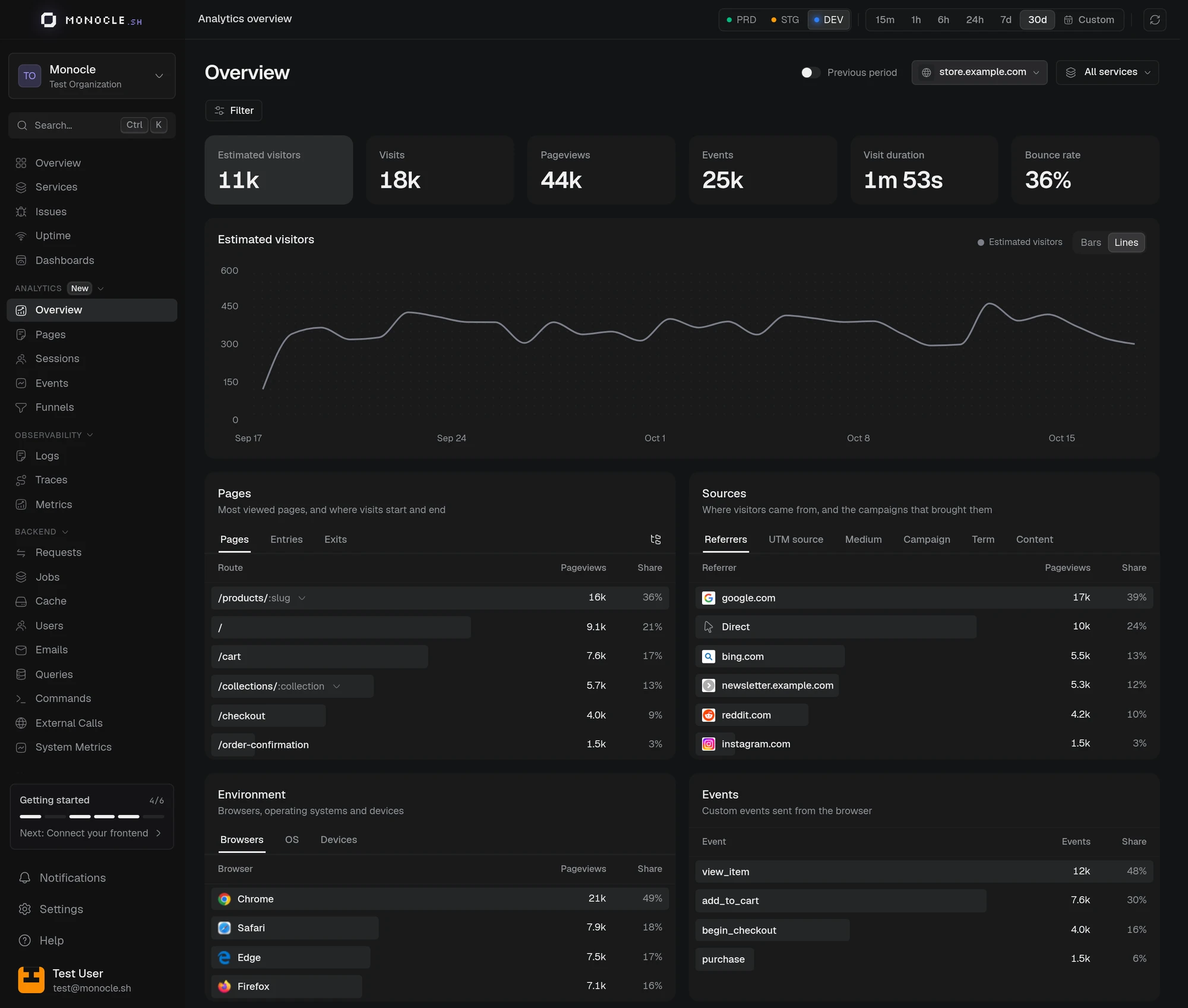
| Estimated visitors | Unique visitors of each day, added over the range. A person who comes back on another day counts again. The count is an estimate, close to the exact value. |
| Visits | Groups of activity by one visitor. A visit ends after 30 minutes without activity, and at midnight UTC. A visit counts in the range where it starts. Activity without a pageview is not a visit. |
| Pageviews | Pages viewed. |
| Events | Custom events sent with track(). |
| Visit duration | Average time between the first and the last activity of a visit. A visit with one activity lasts 0 seconds. Time spent after the last activity is not measured. |
| Bounce rate | Share of visits with exactly one pageview, even if they include custom events. |
| Conversion | Share of visitors who sent the selected event. Shown when you filter on one event. |
Requests that don't carry an IP address and a User-Agent get no visitor ID. They still count as pageviews and events, and the visitor card shows —.
Overview
The Overview shows the metrics above for the selected range, with a chart of the one you click. Previous period compares each metric with the period of the same length just before. The comparison is off when that period goes past the retention.
Below the chart, each card lists the top values. Click a row to filter the whole page on it.
| Card | Tabs | Counts |
|---|---|---|
| Pages | Pages, Entries, Exits | Pageviews |
| Sources | Referrers, UTM source, Medium, Campaign, Term, Content | Pageviews for referrers, visits for UTM values |
| Environment | Browsers, OS, Devices | Pageviews |
| Events | None | Events |
| World map | Countries | Pageviews |
| Location | Countries, Regions, Cities | Pageviews |
The referrer is the hostname of the external page that linked to yours, such as google.com, without its path. Direct means the browser sent no referrer. Each visit takes its UTM values from its first pageview.
Locations come from the IP address, looked up in the DB-IP database. They are approximate and stop at the city. Private IP addresses have no location.
Browsers are Chrome, Edge, Firefox, Safari, or Other. Devices are Desktop, Mobile, or Tablet.
Event properties
Filter on one event to see its Properties card, with one tab per property. A value appears only once at least 3 visitors sent it. Numbers also show their sum, average, minimum, and maximum. You can't filter on a property.
Sites and services
The Site picker in the header lists each hostname that sent analytics, such as store.example.com. All sites adds them up, so a visitor of two sites counts twice. The site and service you pick stay selected on every Analytics page. When several services report for one site, the Service picker narrows the data to visits that involve the selected service.
The service filter of the other dashboards doesn't apply to Analytics.
Filters
Click Filter to narrow every card and chart. Filters combine with AND and are kept in the URL.
| Group | Dimensions |
|---|---|
| Pages | Page, Route, Entry page, Exit page, Entry route, Exit route |
| Acquisition | Source, UTM source, UTM medium, UTM campaign, UTM term, UTM content |
| Location | Country, Region, City |
| Technology | Browser, Operating system, Device |
| Behaviour | Event |
is matches any of up to 50 values. is not excludes one value. contains matches part of the text and is case-sensitive.
Entry, exit, UTM, and event filters select whole visits. For example, Event is purchase keeps every pageview and event of the visits that sent purchase.
Pages
Pages lists every page with its pageviews, daily visitors, visits, bounce rate, and average duration. Search by path, and sort by pageviews, visitors, or name.
By default, pages are grouped by route, such as /blog/:slug. Expand a route to see its 10 most viewed URLs, or switch to URLs to list each path on its own.
Monocle builds the route on its own by replacing the segments that look like identifiers with :id: numbers, UUIDs, hexadecimal hashes of 8 or more characters, and tokens of 16 or more letters and digits. Readable slugs such as /blog/launch stay as they are. To use the templates of your router, pass route to analytics().
On this page, the metrics of a row are specific to the page:
- Sessions counts the visits that viewed the page, once per visit.
- Bounce rate counts the visits that started on the page and viewed no other page.
- Avg. duration is the time until the next pageview or the last activity on the page. Visits that left from the page are not counted.
Events
Events lists your custom events with their trend, count, visitors, and conversion. Click an event to open the Overview filtered on it, with its properties.
Sessions
Sessions lists the visits of the range, newest first. Search by entry or exit page, and sort by duration, pageviews, or events. Each row shows the location, the source and campaign, the entry and exit pages, the number of pages and events, the duration, and the device. Bounced marks a visit with a single pageview, and Live a visit with activity in the last 5 minutes.
Click a visit to see its source, campaign, device, and the services it involved, then its Journey: every page and event in order, timed from the start of the visit. The journey shows the first 200 steps.
A visit stays anonymous. It has no link to your users or to the visitor's other visits, and the journey doesn't show event property values.
Funnels
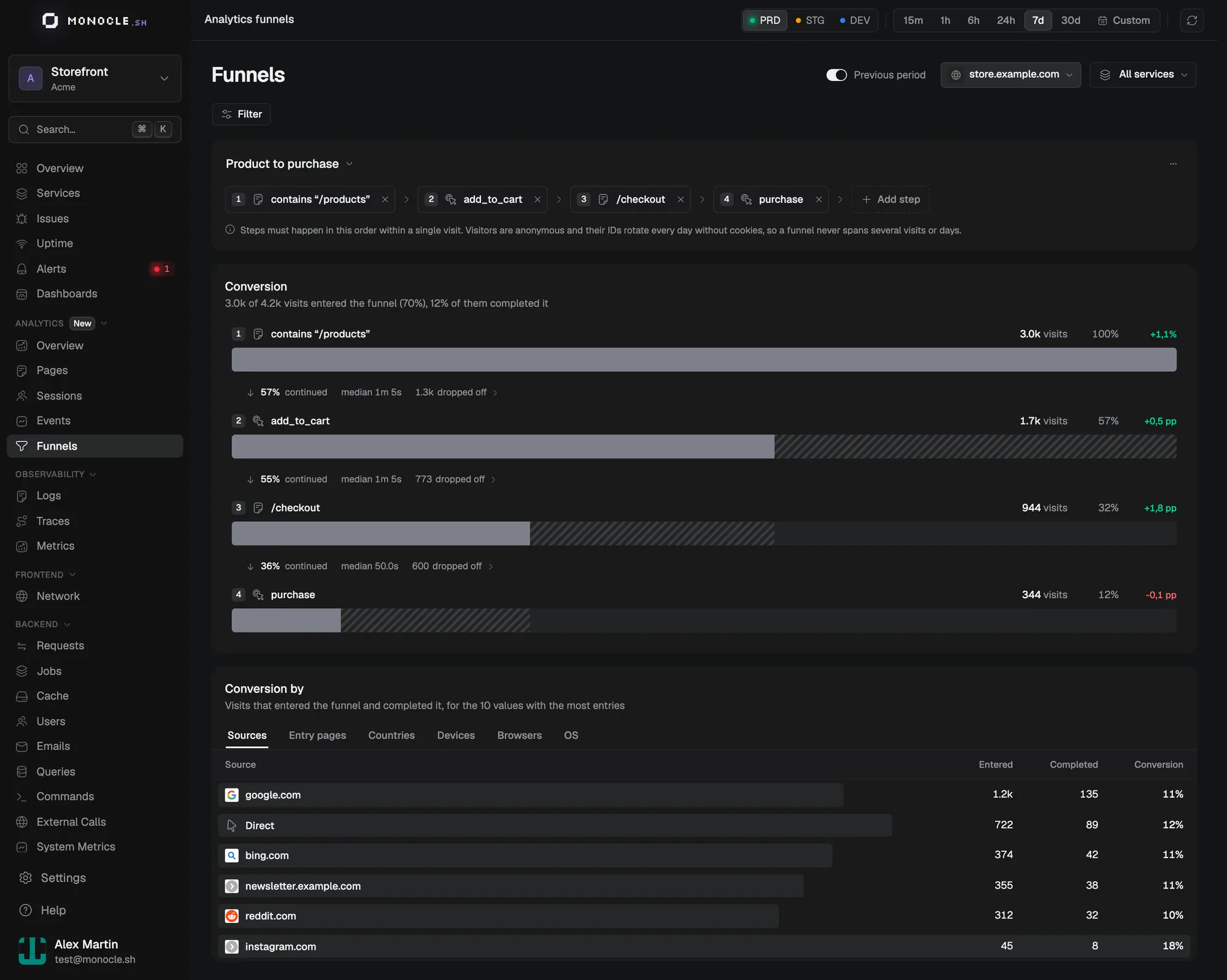
A funnel shows how many visits go through a series of steps, and where the others stop.
Build a funnel
- Open Funnels under Analytics.
- Click Add step, then pick the kind of step:
- A page view (URL) matches a path, such as
/checkout. - A page view (route) matches a route, such as
/products/:slug. - A custom event matches an event name, such as
purchase.
- A page view (URL) matches a path, such as
- Add 2 to 8 steps.
Page and route steps accept is or contains. Event steps accept is. A step with several values matches any of them, up to 20.
The funnel is saved in the URL, so a copied link opens the same funnel. To keep it in the list of the environment, click Save funnel and give it a name. Everyone with access to the environment can open, rename, and delete saved funnels. A saved funnel keeps its steps, but not the site, time range, or filters.
Read the results
The steps must happen in order, within one visit. Other pages and events can come between two steps. Because a visit ends after 30 minutes without activity and at midnight UTC, a funnel can't follow someone across several visits or days.
Conversion shows the visits that reached each step, the share that continued, and the median time from the previous step. Click dropped off to list, in Sessions, the visits that stopped at that step.
Conversion by splits the entries and completions by source, entry route, entry page, country, device, browser, or OS, for the 10 values with the most entries.
Retention
Monocle keeps analytics data for 90 days. During the beta, analytics doesn't count toward your log usage.
Limits
Analytics doesn't follow the Do Not Track setting, record screen sizes, or sample events. To skip analytics for visitors who enabled Do Not Track, leave analytics() out of the integrations when navigator.doNotTrack is '1'.